
Tung Tung Tung Sahur AI Prompts: 15 Scene Ideas
Try 15 Tung Tung Tung Sahur AI Prompts for playful scenes, wallpapers, avatars, and photo edits, with practical tips for consistent results and upscaling.
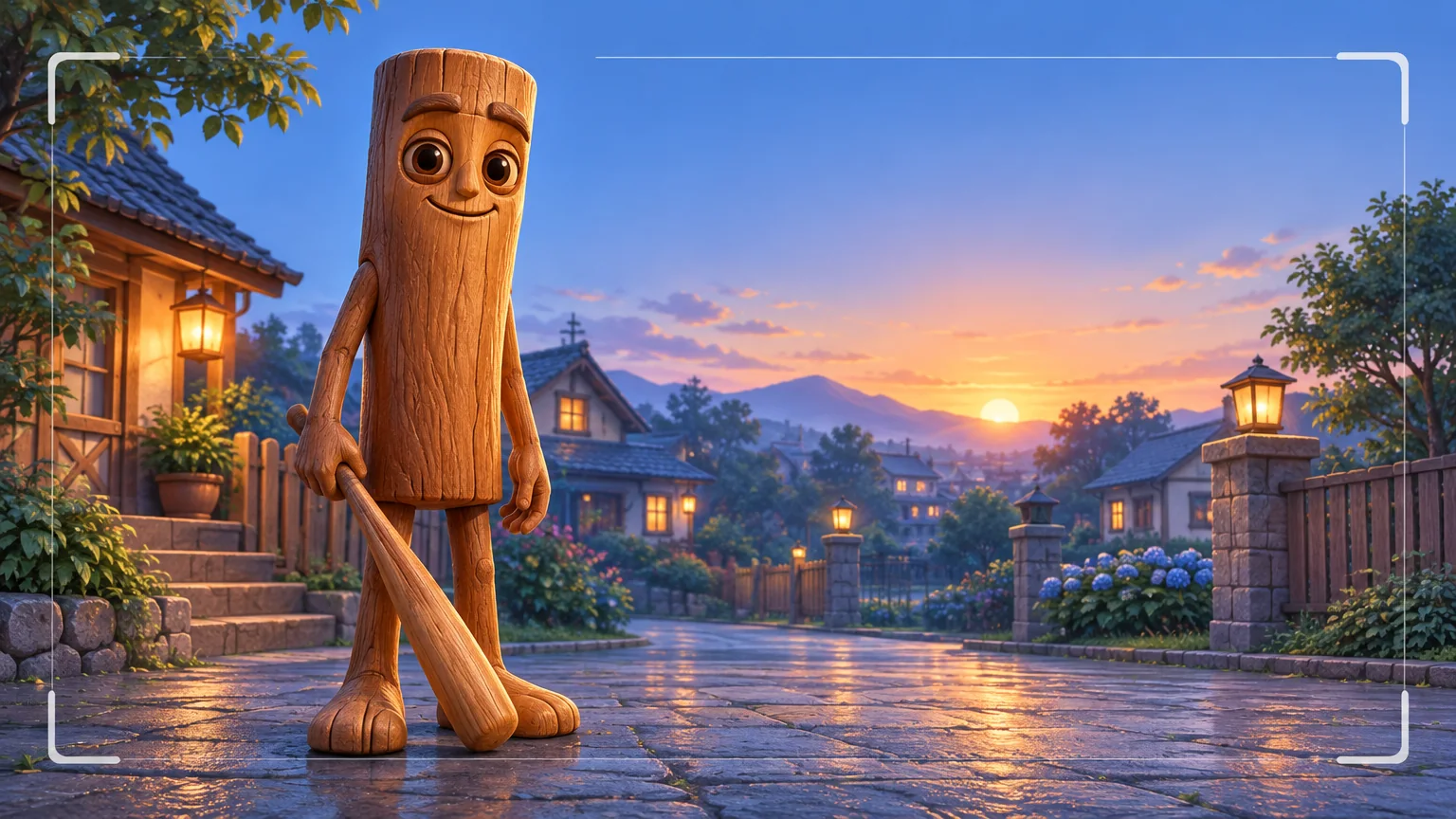
Tung Tung Tung Sahur AI Prompts can help you create playful, consistent images of the viral wooden-log character in scenes, wallpapers, avatars, and edits of your own photo. Start with a clear character description, add one simple setting and camera direction, then check the source image before preparing it for upscaling.
What's new on this page
- 2026-11-26 — Page published. Added original Tung Tung Tung Sahur prompts with consistency tips.
Build a useful prompt before you generate
Tung Tung Tung Sahur is a 2025 viral “Italian brainrot” meme character: a tall, wooden log-like figure carrying a wooden bat. The name riffs on the repeated drum call used to wake people for sahur, the pre-dawn Ramadan meal in Indonesia. Keep that context in mind when you choose a scene: a cheerful dawn wake-up is a better fit than a threatening one.
A prompt works best when it separates what must stay consistent from what can change. Describe the character first; then give it a setting, mood, composition, and image format. Keep the bat as a harmless prop—resting at the character’s side or used as a pretend drumstick against a drum, never directed at a person.
Character details to repeat
- Shape: tall, upright, rounded wooden log body; simple arms and legs.
- Face: friendly, expressive eyes and a small smile carved or painted into the wood.
- Prop: one plain wooden bat, held downward or tucked beside the body.
- Style: choose one, such as polished 3D animation, picture-book illustration, or toy photography.
- Avoid: extra limbs, extra bats, threatening expressions, realistic injuries, and text baked into the image.
Treat these details as a reusable character recipe. Change the location, pose, color palette, and framing—not the character’s basic silhouette.
15 ready-to-adapt prompt ideas
Replace bracketed details with your preferences. Add “no words, no watermark, no logos” when you want clean artwork for a wallpaper or profile image.
| Use | Prompt |
|---|---|
| Dawn scene | “A friendly tall wooden log character with a small carved smile and one wooden bat held safely at its side, walking through a quiet Indonesian neighborhood at blue-hour dawn, warm windows, soft lantern light, whimsical 3D animation, full-body view, calm festive mood, no text.” |
| Sahur drummer | “The same friendly log character tapping a small hand drum with a separate soft drum mallet, never touching another character, pre-dawn kitchen and lanterns in the background, playful children’s-book illustration, clear silhouette.” |
| Rooftop sunrise | “A tall smiling wooden log figure standing on a safe, broad rooftop terrace, wooden bat resting on the ground beside it, watching a peach sunrise over distant rooftops, cinematic wide composition, gentle mood.” |
| Lantern walk | “The same log character carrying a glowing paper lantern while strolling down a peaceful street before sunrise, wooden bat secured at its side, cozy storybook art, blue and amber palette, no readable signs.” |
| Market helper | “A cheerful wooden log character helping arrange dates and fruit at a small dawn market stall, bat leaned safely against the stall, friendly vendors in the distance, warm illustrated scene, non-violent.” |
| Rainy morning | “The friendly log character under a clear umbrella on a quiet rainy street at dawn, wooden bat held downward, reflections in puddles, soft 3D animation, expressive face, uncluttered composition.” |
| Garden break | “A smiling wooden log character sitting on a garden bench with its bat beside it, crescent moon fading into morning, dew-covered plants, peaceful picture-book illustration, portrait orientation.” |
| Minimal wallpaper | “Centered full-body portrait of the friendly wooden log character, bat resting beside its feet, simple pale sunrise gradient, generous empty space around the silhouette, clean soft 3D render, vertical phone wallpaper, no text.” |
| Night wallpaper | “The same character beneath a deep navy sky with small glowing lanterns, bat pointed safely toward the ground, balanced symmetrical layout, subtle wood grain, high-contrast desktop wallpaper, no lettering.” |
| Avatar close-up | “Friendly close-up avatar of a rounded wooden log character with bright kind eyes and a small smile, one bat handle barely visible at the edge, plain mint background, centered face, crisp illustrated style, square crop.” |
| Sticker portrait | “A cheerful waist-up wooden log character waving with one hand, wooden bat strapped securely behind its shoulder, bold simple shapes, clean cream background, sticker-ready composition, no outline text.” |
| Your photo: dawn visitor | “Use my uploaded photo as the scene and preserve the people’s identity, faces, pose, clothing, and framing. Add a small friendly wooden log character standing in the open background, holding its bat downward, matching the photo’s light and perspective; do not cover or alter anyone.” |
| Your photo: playful photobomb | “Keep my uploaded photo’s people, expressions, and setting unchanged. Add the same smiling wooden log character peeking from behind an empty doorway in the background, bat safely beside it, natural scale and matching shadows, lighthearted, no contact with people.” |
| Your photo: illustrated scene | “Transform my uploaded photo into a gentle picture-book illustration while preserving the people’s recognizable faces, clothing, pose, and composition. Place a friendly wooden log character near the edge of the scene with its bat pointed down; soft dawn colors, no violence.” |
| Your photo: wallpaper crop | “Use my uploaded photo as the base, keeping the subject recognizable and unchanged. Extend the background vertically with a calm dawn sky and add the friendly wooden log character at a distance, bat resting beside it; leave clear space above, natural lighting, phone wallpaper.” |
For image-to-image ideas, use a photo you have permission to edit and specify which parts should remain unchanged. If your tool provides controls for image strength or reference guidance, adjust them gradually and inspect the result; controls and labels can vary by tool. You can explore the available AI image tools before choosing a workflow.
Prepare the image for upscaling
Upscaling can enlarge an image, but it cannot reliably restore details that were never clear in the source. Before preparing a favorite result, check the original file’s dimensions and inspect the face, wood grain, hands, and bat. Make sure there is enough space around the character for your intended crop.
Use this quick source check:
- Confirm the subject is clear. The log silhouette and friendly expression should read at the size you plan to use.
- Check edges and small details. Look for distorted fingers, duplicate props, smeared eyes, or unwanted letters.
- Choose the final shape first. A square avatar, vertical phone background, and horizontal desktop image need different framing.
- Keep a clean source copy. Save the generated original before editing or enlarging it.
- Review after processing. Inspect the result at normal viewing size as well as close up; added sharpness should not make wood grain or facial details look harsh.
3YTV’s positioning centers on preparing video upscaling with source measurements, supported controls, and a quote. For a still image, start by checking the image workflow and source requirements rather than assuming video controls apply. If you want to turn a character concept into a moving scene, browse the AI video tools and plan a short, simple action such as waving or walking.
Keep character results consistent
Use a short, fixed description at the beginning of every prompt. For example: “the same tall, friendly wooden log character, rounded upright body, small carved smile, one wooden bat held safely downward.” Copy it exactly, then add just one or two changes per version.
A few practical habits help:
- Keep the style words consistent across a set; don’t switch between photorealism and cartoon art mid-series.
- Reuse a reference image if your chosen tool supports one, and check its available controls rather than assuming a particular setting exists.
- Specify camera and crop: “full-body, centered, vertical” is more useful than “make it look good.”
- State what must stay fixed in photo edits, especially faces, pose, and framing.
- Generate a small set of variations, compare them, and revise the prompt’s weakest detail instead of changing everything at once.
FAQ
Can I use these prompts with any image generator?
They are written as plain-language prompts, but tools differ in how they interpret instructions and image references. Adjust the wording to the controls and formats your chosen tool supports.
How do I make the character look the same in every image?
Repeat the same silhouette, face, bat placement, and art style. If available, reuse a reference image or supported consistency controls, and change only the scene details.
Can I add the character to a photo of myself?
Yes—use a photo you have permission to edit and clearly say what must remain unchanged. Ask for the character to stay in open background space, away from people, and keep the bat pointed down or resting safely.
Should I upscale before or after editing?
Usually, finalize the composition and inspect the generated source before preparing it for upscaling. Check the workflow’s source requirements and controls first; don’t expect enlargement to fix a confusing or flawed image.
For a character clip rather than a still image, start with 3YTV’s AI video tools and prepare a clear, simple motion brief before choosing a workflow.